
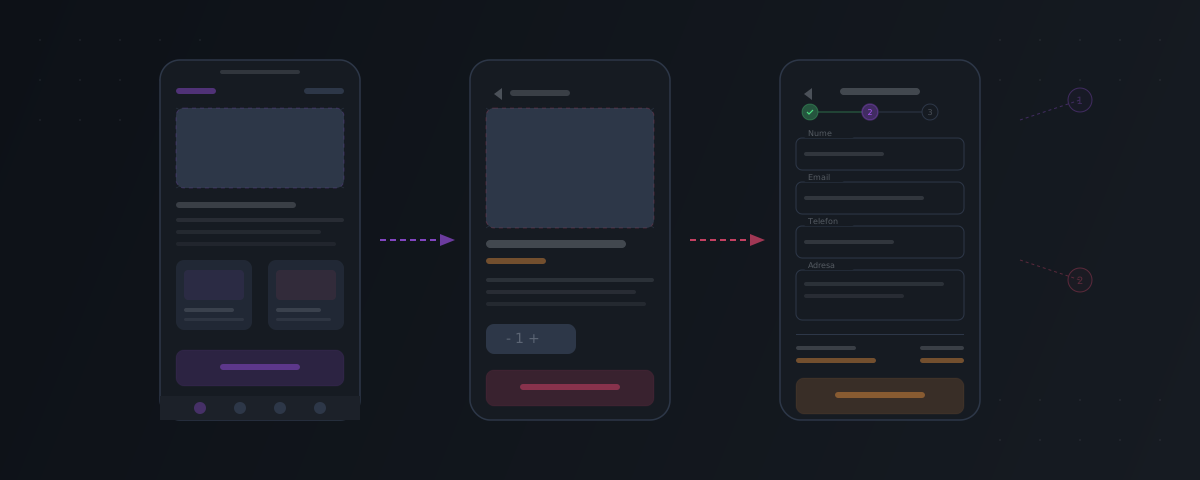
Think of a wireframe as the blueprint of a house. Nobody pours the foundation without a plan — and yet, a surprising number of software projects jump straight into code without a clear sketch of what's being built.
A wireframe prevents all of that.
In short: Wireframes are the cheapest form of validation — it's easier to move a rectangle than to rewrite a component. A good set of wireframes aligns the team, reduces ambiguity, and prevents surprises during design. Don't skip straight to code or final UI.
What a Wireframe Is
A wireframe is a schematic visual representation of the pages or screens of an application. It doesn't contain colors, decorative fonts, or real images — only structure: what elements appear on screen, where they're positioned, and how the user interacts with them.
Think of a wireframe as a technical drawing: it shows you where each "room" is, how big it is, and how it connects to the others. But it doesn't show you the wall color or the furniture.
What a wireframe includes:
- The structure of each screen — header, content, sidebar, footer
- UI elements — buttons, forms, lists, cards, menus
- Information hierarchy — what the user sees first, what's secondary
- Navigation — how to get from one screen to another
- User flows — the steps from A to B (e.g., from search to order to payment)
What it does NOT include:
- Final colors
- Decorative fonts
- Real images
- Animations or micro-interactions
- Final content (placeholders are used instead)
Why Wireframes Save Money
1. They Catch Problems Early
It's much cheaper to move a rectangle in a wireframe than to rewrite the code for an already implemented screen. The wireframe stage is the cheapest point in a project where you can make changes.
2. They Align the Vision
The client and the development team get on the same page — literally. When you see the wireframe, you can immediately say: "Something's missing here" or "That's not what I had in mind." Much harder to spot in a 30-page text document.
3. They Enable Better Estimates
When the team sees all the screens and flows, they can provide a realistic estimate. Without wireframes, estimating is guesswork — and guesswork is almost always too optimistic.
4. They Force Prioritization
A wireframe forces you to decide: what matters most on this screen? What does the user see first? What can you remove? This prioritization exercise produces better, simpler applications.
What the Wireframing Process Looks Like
Step 1: Screen Inventory
Starting from requirements, you list all the screens needed. Example for an e-commerce application:
- Home / Catalog
- Product page
- Shopping cart
- Checkout (address, shipping, payment, confirmation)
- My Account (orders, settings, addresses)
- Admin pages (dashboard, product management, orders)
Step 2: User Flows
You define the main journeys: how does the user get from point A to point B? What steps do they go through? Where might they drop off?
Example: Purchase flow
Catalog → Product page → Add to cart → Cart → Checkout → Payment → Confirmation
Step 3: Low-Fidelity Wireframe
First sketches — rectangles and text, no details. The goal is to validate the structure: "Does this screen make sense?". This is where you discuss and iterate quickly.
Step 4: Mid-Fidelity Wireframe
More detail is added: real (or near-real) text, proportional dimensions, element states (active/inactive buttons, error messages, empty states).
Step 5: Interactive Prototype
Screens are linked together to simulate navigation. You can "use" the app without a single line of code — and you can test it with real users.
Wireframing in 2026: Tools and AI
Figma Remains the Standard
Figma is the dominant tool for wireframing and interface design. Its advantages:
- Real-time collaboration (like Google Docs, but for design)
- Reusable components and design systems
- Built-in interactive prototyping
- Accessibility and responsive design plugins
- Integrated AI features for generating layouts and variants
AI-Assisted Wireframing
Tools in 2026 significantly speed up the process:
- Layout generation from text — describe a screen in words and AI generates a starting wireframe
- Automated UX analysis — identifies accessibility issues, visual hierarchy problems, or inconsistencies
- Design-to-code — wireframes automatically transformed into functional frontend code
Important: AI accelerates, but doesn't replace human judgment. A good wireframe reflects a deep understanding of users and the business — not just an aesthetic arrangement of elements.
Wireframe Myths
"It's a waste of time, we can go straight to design"
Design without a wireframe is like painting without a sketch. You'll spend more time redoing the final design than you would have invested in the wireframe.
"We can sketch on paper, it's the same thing"
Paper sketches are useful for brainstorming, but they don't replace a digital wireframe. You can't iterate quickly, you can't create an interactive prototype, and you can't test with users.
"Clients don't understand wireframes"
A good wireframe, presented properly, is easier to understand than a 50-page requirements document. Features become visible, not abstract.
Wireframing at Brainic
At Brainic, we can include wireframes in discovery when the interface needs clarification. Depending on the agreed scope, the work may include:
- Screen and flow inventory — based on validated requirements
- Mid-fidelity wireframes — clear structure for each screen
- Interactive prototype — simulated navigation for stakeholder validation
- Review session — we walk through each screen together and document feedback
- Iterations — adjustments within agreed limits, based on feedback
Wireframes can reduce ambiguity and the risk of rework. They do not eliminate requirements changes, technical unknowns, or estimation uncertainty.
Have a project in mind? We can discuss whether a wireframe or prototype would help with the next decision.